
Best AI Video Editor for iPhone (2026): 8 Apps Ranked
The best AI video editor for iPhone and iOS in 2026: 8 apps ranked by captions, silence removal, speed, and price for TikTok, Reels, and Shorts.


The best AI video editor for iPhone in 2026 depends on what you need the AI to do. For footage of you talking to the camera, BlitzCut AI is the fastest: it removes silence, writes captions, and lets you cut by editing the transcript. For AI avatars, dubbing, and caption styles, Captions. For templates, effects, and AI-generated video, CapCut. For a free editor with no watermark, Instagram's Edits or Adobe Premiere mobile. For turning a long recording into short clips, OpusClip. All eight apps below run natively on iPhone and iOS, and the ranking explains what each one's AI actually does.
Best AI Video Editors for iPhone: Quick Rankings
| App | What the AI does best | US price (App Store) | Best for |
|---|---|---|---|
| BlitzCut AI | Silence removal, captions, transcript editing, AI chat edits | 3-day trial, then from $6.99/wk* | Talking-head creators posting daily |
| Captions | AI Edit, avatars, dubbing in 29 languages | Free tier / $9.99/mo Basic / $24.99 Max | Scripted and multilingual content |
| CapCut | Auto captions, background removal, AI video generation | Free / $9.99/mo Standard / $19.99/mo Pro | Effects, templates, trends |
| Edits (Instagram) | Auto captions, AI animation, voice enhance | Free | Reels creators on a budget |
| Adobe Premiere mobile | AI captions, Enhance Speech, Firefly generative tools | Free (Firefly credits extra) | Full timeline editing, for free |
| OpusClip | Finds the best clips in a long video | Free tier / $15/mo / $29/mo | Podcasters repurposing long-form |
| VN | Auto captions, smart cutout, text-to-speech | Free / optional VN Pro | Manual editing with AI assists |
| InShot | Auto captions, background removal, AI effects | Free with ads / Pro from ~$3.99/mo | Quick general edits |
*US prices. BlitzCut pricing varies by region; see the price in your country. Competitor prices were checked against US App Store listings in October 2026 and can differ by country.
What Counts as an AI Video Editor?
"AI video editor" covers two different kinds of app, and most rankings mix them up:
- Apps that edit footage you filmed. The AI cuts pauses, transcribes speech, styles captions, reframes to 9:16, or cleans up audio. You start with your own clip and end with a better version of it.
- Apps that generate footage. The AI makes video from a text prompt, a photo, or an avatar. You start with an idea and the app produces the visuals.
If you film yourself talking, the first kind saves you the most time, because cutting and captioning are the slow parts of editing on a phone. If you need visuals you can't film, the second kind helps. Some apps on this list (CapCut, Captions, Premiere mobile) do a bit of both.
How We Ranked These iPhone AI Video Editors
- What the AI does to your own footage: silence removal, captions, transcript editing, reframing, audio cleanup.
- Native on iPhone: a real iOS app, not a website you open in Safari.
- Time from raw clip to a post-ready video: fewer manual steps ranks higher.
- Price and watermark: what you pay to export a clean video.
BlitzCut AI is our product, and it ranks first for talking-head content because that's what it's built for. For other jobs we name a different app, and every app's limitations are listed.
1. BlitzCut AI: Best AI Video Editor for Talking-Head Videos on iPhone
What the AI does: Removes every silence in one pass, transcribes your speech, and adds word-by-word animated captions. You can edit by deleting words from the transcript, or type a request into the AI Editor chat ("remove silences," "add zoom effects," "generate captions") and it makes the edit on your timeline.
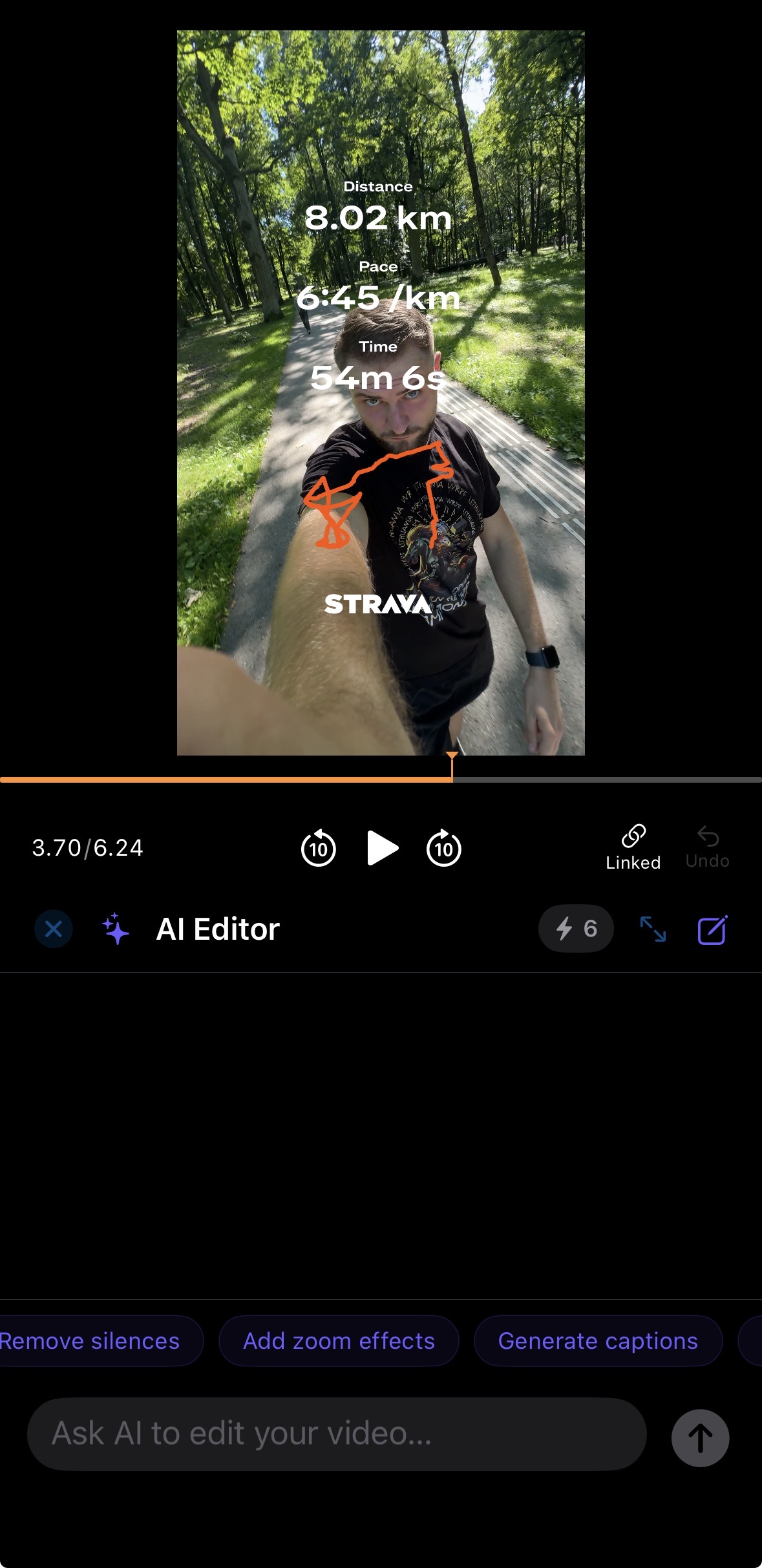
BlitzCut's AI Editor on iPhone: type what you want changed, or tap a shortcut like Remove silences or Generate captions.
Why it's #1: On most iPhone editors, the slow parts are manual: scrubbing for pauses, splitting clips with your thumb, typing captions. BlitzCut automates those three steps, so a talking-head clip is cut and captioned in about 2 minutes. Everything the AI does lands on a normal timeline, so you can still trim, split, reorder, and undo by hand.
Feature highlights:
- One-tap silence removal with adjustable padding, processed on the device
- AI captions with word-by-word highlighting and styles, fonts, colors, outlines, and shadows
- Edit by transcript: delete a word or sentence and the footage is cut
- AI Editor chat for plain-language edits
- 9:16, 1:1, and 16:9 presets with speaker tracking when you crop to vertical
- Multi-track timeline with image overlays, music, and sound effects
- Projects sync over iCloud between iPhone, iPad, and Mac
- No watermark on exports
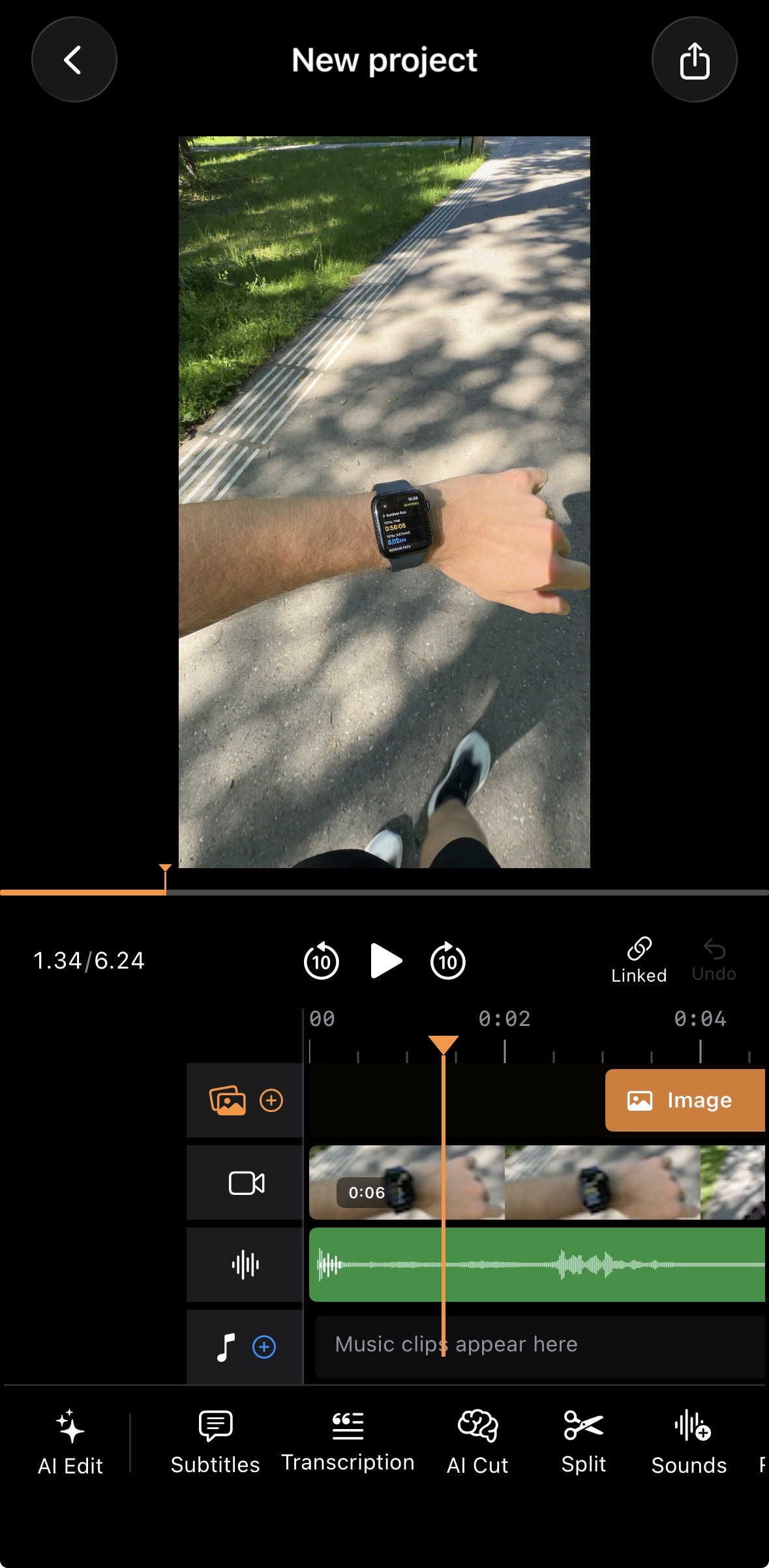
The timeline is there when you want manual control: overlays, video, audio, and music tracks, plus AI Edit and AI Cut in the toolbar.
Pricing: 3-day free trial, then $6.99/week, $16.99/month, $69.99/year, or $129.99 lifetime*. One purchase covers iPhone, iPad, and Mac.
Limitations: Built for footage of people talking, not cinematic edits. A smaller effects and template library than CapCut. No AI video generation from prompts. No Android version.
Ideal user: A creator who films talking-head videos on iPhone and posts to TikTok, Reels, or Shorts several times a week.
Download BlitzCut AI · How the iPhone editor works
2. Captions: Best for Scripted and Multilingual Creators
What the AI does: One-tap AI Edit, a chat-based editor for transitions, B-roll, and pacing, AI avatars made from a selfie, dubbing into 29 languages, and subtitles in 91+ languages.
Why it's #2: Captions has the widest set of AI tools of any iPhone app on this list. The built-in teleprompter and eye contact correction (documented in Captions' help center) suit creators who read from a script, and dubbing makes it the strongest choice if you post in several languages.
Feature highlights:
- AI Edit and a chat editor that takes plain-language requests
- AI avatars and stock AI actors
- AI dubbing (29 languages) and subtitles (91+ languages)
- AI Denoise, AI Zoom, AI Scale (aspect-ratio resizing), AI Hashtags
- Teleprompter for recording in the app
Pricing: Limited free tier. Basic is $5.99/week, $9.99/month, or $64.99/year. Max is $24.99. Many AI features use monthly credits, so heavy users may need the higher plan.
Limitations: Credit-based pricing makes the real cost harder to predict. Advanced AI features need a subscription. Not focused on cutting long pauses out of unscripted footage.
Ideal user: A creator who scripts videos, posts in multiple languages, or wants AI avatars and the most caption animation options.
Captions vs BlitzCut AI compared
3. CapCut: Best for Effects, Templates, and AI-Generated Video
What the AI does: Auto captions, automatic background removal, text-to-speech in multiple voices, and text- or image-to-video generation using models including Seedance and Veo 3. Silence removal exists, but it's a Pro feature.
Why it's #3: CapCut is the most popular mobile editor (4.6 stars from more than a million App Store ratings) and has the largest library of trending templates and effects. Its AI tools cover a lot of ground, but the strongest ones now sit behind the Pro plan.
Feature highlights:
- Auto captions from speech recognition
- AI background removal without a green screen
- AI video generation from text or images
- Text-to-speech in many languages and voices
- Trending TikTok templates, effects, transitions
- iOS, Android, Mac, Windows, and web
Pricing: Free with basic tools. On the US App Store, Standard is $9.99/month and Pro is $19.99/month (yearly plans from $89.99). Most of the AI toolkit and 4K export need Pro.
Limitations: Auto captions need manual styling to look like viral captions. Silence removal is paywalled and buried in menus. Some free templates and effects add a watermark. The number of features can overwhelm beginners.
Ideal user: A creator who uses trends, templates, and effects and wants AI-generated visuals in the same app.
4. Edits by Instagram: Best Free AI Video Editor for Reels
What the AI does: Auto captions with editable styling, AI animation that turns still images into video, voice enhancement and background noise removal, and green screen with cutouts.
Why it's #4: Edits is Meta's free editor for Reels creators, and it's one of the few apps on this list with no paid tier at all: 4K export, no watermark, no subscription. In June 2026 Meta announced an AI assistant that suggests what to post and when, based on your Instagram performance data.
Feature highlights:
- Auto captions with customizable appearance
- AI image animation
- Voice enhancement and noise removal
- Green screen, cutout, and video overlays
- 4K export, no watermark
- Direct sharing to Instagram, plus Reels insights and trending audio
Pricing: Free. Instagram head Adam Mosseri has said some advanced AI features may need a subscription in the future.
Limitations: No automatic silence removal. Built around Instagram, so the workflow is less useful if you mainly post elsewhere. App Store reviewers report crashes and failed exports on some devices.
Ideal user: A Reels-first creator who wants a free editor with captions and no watermark.
5. Adobe Premiere mobile: Best Free Timeline Editor With AI
What the AI does: AI auto captions with animated styles, Enhance Speech for studio-quality voice, generative sound effects (including from your own voice), and Firefly AI for generating images, video, and stickers from text.
Why it's #5: Premiere mobile replaced Premiere Rush in 2025 and is a capable, free multi-track editor with no watermark and 4K export. It launched on Android on September 22, 2026, so it now runs on both platforms. Its AI tools are good, but the workflow is still a manual timeline: there's no automatic silence removal, and captions take more steps than in a dedicated caption app.
Feature highlights:
- AI auto captions with animated styles
- Enhance Speech for voice cleanup
- Firefly generative AI: images, video, sound effects, stickers
- Multi-track timeline with frame-level trimming
- 4K export, no watermark
- Free music and sound library
Pricing: Free for core editing. Firefly generative credits and extra cloud storage are paid.
Limitations: No silence removal. Slower for talking-head content than a transcript-based editor. Generative AI features use paid credits.
Ideal user: A creator who wants a full editing suite for free, or a Creative Cloud user who wants mobile editing that connects to Premiere Pro.
Adobe Premiere mobile vs BlitzCut AI
6. OpusClip: Best for Turning Long Videos Into Clips
What the AI does: Scans a long video (podcast, interview, webinar, YouTube video), finds the strongest moments, and turns them into captioned vertical clips.
Why it's #6: OpusClip, formerly Opus Clip, solves a different problem from the other apps. It answers "which part of this hour-long recording should I post?" rather than "how do I polish the clip I filmed?" It now has a native iPhone app (4.9 stars from 7.7K ratings) with captions, branding templates, and scheduling to TikTok, YouTube, and other platforms.
Feature highlights:
- AI highlight detection in long videos
- Automatic clipping, reframing, and captions
- Caption editor and brand templates
- Publishing and scheduling to social accounts
- Background uploads and cloud projects
Pricing: Free tier with 60 monthly credits and watermarked exports. Starter is $15/month, Pro is $29/month or $174.99/year.
Limitations: Processing happens in the cloud, so long videos have to upload first. Credits limit how much you can process. Not built for polishing short clips you filmed for social.
Ideal user: A podcaster or YouTuber with long recordings who wants AI to pick and cut the highlights.
7. VN: Best Manual Editor With Light AI Assists
What the AI does: Auto captions from speech, intelligent cutout (background removal), and text-to-speech voiceovers. The App Store name is now "VN: AI Video Editor."
Why it's #7: VN is mainly a manual editor, and its free tier is strong: multi-track timeline, keyframes with custom curves, LUTs, chroma key, and no watermark. The August 2026 update added video stabilization and mask shapes. The AI features are useful extras, not the main reason to pick VN.
Feature highlights:
- Multi-track timeline with keyframe animation
- Auto captions and text-to-speech
- Intelligent cutout and chroma key
- Custom LUTs for color grading
- Free with no watermark
Pricing: Free, with an optional VN Pro subscription for advanced effects and export options.
Limitations: No silence removal. Captions need manual styling. A captioned talking-head video still takes a lot of manual work.
Ideal user: A creator who wants creative control for free and uses AI only occasionally.
8. InShot: Best for Quick General Edits
What the AI does: Auto captions, automatic background removal, AI effects, and smart tracking.
Why it's #8: InShot is one of the most downloaded editors on the App Store and handles quick edits well: trimming, music, speed, filters, and stickers. Its AI tools are basic compared with the apps above, and reviewers rate its captions behind CapCut's.
Feature highlights:
- Auto captions
- AI background removal and AI effects
- Multi-clip timeline with transitions
- Music library, speed control, filters, stickers
Pricing: Free with ads and a watermark. Pro starts around $3.99/month, with yearly and lifetime options that vary by region.
Limitations: Watermark and ads on the free version. No silence removal. Limited AI compared with the rest of this list.
Ideal user: A creator who wants a simple, cheap editor for music-driven or montage videos.
InShot vs BlitzCut AI compared
What About Descript on iPhone?
Descript is a well-known AI video editor, but it has no official iPhone or iOS app. It runs on Mac and Windows only. App Store listings with "Descript" in the name come from unrelated developers, so check the seller before installing anything. If you want Descript-style transcript editing on iPhone, BlitzCut does that natively. More on Descript and mobile.
Best iPhone AI Video Editor for Each AI Feature
| AI feature | Best iPhone app | Runner-up |
|---|---|---|
| Silence removal | BlitzCut AI | CapCut (Pro only) |
| Auto captions | BlitzCut AI | Captions |
| Edit by transcript | BlitzCut AI | None on iPhone |
| Chat-based AI editing | BlitzCut AI | Captions |
| Dubbing and translation | Captions | CapCut |
| AI avatars | Captions | CapCut |
| AI video generation | CapCut | Adobe Premiere mobile |
| Clip selection from long videos | OpusClip | Captions |
| Voice cleanup | Adobe Premiere mobile | Edits |
| Background removal (no green screen) | CapCut | Edits |
Free AI Video Editors for iPhone With No Watermark
If you don't want to pay at all, three apps export without a watermark for free:
- Edits by Instagram: auto captions, AI animation, 4K export.
- Adobe Premiere mobile: AI captions, Enhance Speech, full timeline. Generative AI uses paid credits.
- VN: auto captions and cutout, full manual editing.
CapCut is free too, but some templates and effects add a watermark, and most AI tools need Pro. BlitzCut has no watermark during its 3-day free trial, then needs a paid plan. For the full list, see best free video editing apps for iPhone.
Which AI Video Editor for iPhone Should You Choose?
| Your situation | Best app |
|---|---|
| You film yourself talking and post most days | BlitzCut AI |
| You read from a script or post in several languages | Captions |
| You live on trends, templates, and effects | CapCut |
| You post mainly to Instagram Reels and want free | Edits |
| You want a full free timeline editor on iOS or Android | Adobe Premiere mobile |
| You have a podcast or long videos to repurpose | OpusClip |
| You want manual control with a few AI extras | VN |
| You need quick edits with music, cheaply | InShot |
Frequently Asked Questions
What is the best AI video editor for iPhone in 2026?
For talking-head videos, BlitzCut AI is the best AI video editor for iPhone in 2026. It removes silence, adds captions, and lets you edit from the transcript, so a clip is ready to post in a couple of minutes. For AI avatars and dubbing, Captions is the better pick. For effects and AI-generated visuals, CapCut. For repurposing long recordings, OpusClip.
What is the best free AI video editor for iPhone?
Edits by Instagram and Adobe Premiere mobile are the best free options. Both export without a watermark and include AI captions. Edits is better for Reels, and Premiere mobile has the more complete timeline. VN is a good free choice if you mostly edit by hand.
Is there an AI video editor for iOS that removes silence automatically?
Yes. BlitzCut AI removes every silence in one tap on iPhone, iPad, and Mac, and the processing happens on the device. CapCut also has silence removal, but only on the Pro plan. Edits, Premiere mobile, VN, and InShot don't remove silence automatically.
Does Descript have an iPhone app?
No. Descript is desktop-only (Mac and Windows) in 2026. Apps on the App Store with "Descript" in the name come from other developers. BlitzCut AI is an iPhone app with Descript-style transcript editing.
Do iPhone AI video editors work on-device or in the cloud?
It varies. BlitzCut AI removes silence on the device and uses cloud AI for transcription without uploading your video file. OpusClip uploads your video and processes it in the cloud. CapCut, Captions, and Premiere mobile use a mix, and generative features (AI video, avatars, Firefly) always run in the cloud.
Which AI video editors work on both iPhone and Android?
CapCut, Captions, Edits, OpusClip, VN, InShot, and Adobe Premiere mobile (Android since September 2026) all have Android versions. BlitzCut AI runs on iPhone, iPad, and Mac.
The Verdict
Best AI video editor for iPhone if you talk to the camera: BlitzCut AI. It does the cutting and captioning for you, and you can edit by text or by chatting with the AI.
Best for AI avatars and dubbing: Captions.
Best free AI video editor for iPhone: Edits by Instagram for Reels, Adobe Premiere mobile for full timeline editing.
Best for repurposing long-form: OpusClip.
Try BlitzCut AI free for 3 days
Related: AI Video Editor for iPhone and Mac · Video Editor for iPhone: Cut Silence and Add Captions · Best Free Video Editing Apps for iPhone · Best Auto Caption App for iPhone · Best Silence Remover Apps 2026 · Captions vs BlitzCut AI · BlitzCut vs OpusClip
Last Updated: October 9, 2026 Comparison Type: AI video editors for iPhone Apps Ranked: BlitzCut AI, Captions, CapCut, Edits, Adobe Premiere mobile, OpusClip, VN, InShot
Post every day without spending hours editing
BlitzCut is a native app for iPhone, iPad, and Mac. Get from raw footage to TikTok-ready in under 2 minutes, so editing is never the reason you didn't post.
Try it for freeRelated Articles
Keep Reading

Best Adobe Premiere Rush Alternatives (2026): Where to Go Before It Shuts Down
Premiere Rush support ends September 30, 2026. The best alternatives for Mac, iPhone and Android — including Adobe's own replacement — and how to migrate.

Best AI Clipping Tools, Rated by What Users Actually Say (2026)
Best AI clipping tools compared on independent user reviews, billing complaints, and pricing: Vizard, OpusClip, Klap, Quso, and BlitzReels. Plus OpusClip alternatives.

Best AI Video Editing Software in 2026: 8 Picks by Use Case
Compare the best AI video editing software for Reels, YouTube, podcasts, and mobile: 8 picks with clear use cases, current pricing, and free-plan limits.