
Instagram Reels Algorithm 2026: The Editing Signals That Drive Reach
Adam Mosseri confirmed the top Reels signals in 2026: watch time, likes per reach, and DM shares. Here's what each signal means for how you edit and post.


The Instagram Reels algorithm in 2026 ranks on three signals that Instagram's head, Adam Mosseri, confirmed in early 2025: watch time (especially completion rate), likes per reach, and DM shares. Of the three, DM shares — when someone sends your Reel to a specific person via direct message — carry the most weight per individual action. A Reel shared to one non-follower via DM signals more quality to the algorithm than 50 passive likes from existing followers. How you edit directly affects all three.
This is the practical guide for creators who want to understand what the Reels algorithm actually rewards and the specific editing choices that move those signals.
What Changed in the Reels Algorithm (2025–2026)
Four significant changes reshaped Reels performance:
1. DM shares to non-followers became the strongest per-unit signal Instagram's 2025 update elevated send-to-DM actions — especially to people who don't follow you — above saves and likes as an individual quality signal. When a viewer sends your Reel to a specific person, Instagram interprets that as evidence of genuine value.
2. Originality Score penalizes recycled content Instagram now runs an "Originality Score" check on every uploaded Reel. Videos posted elsewhere (with visible watermarks, or identified as duplicate content via fingerprinting) receive significantly reduced reach. CapCut watermarks and TikTok reposts are specifically penalized.
3. Edits after posting reset engagement signals Modifying a Reel caption after publishing resets part of its algorithmic momentum. Editing the video itself after posting is treated like a new submission — engagement signals accumulated before the edit are discarded. Finalize everything before publishing.
4. High-resolution, native-format content is rewarded Instagram's algorithm actively detects video quality and native formatting. A Reel shot and exported at 1080×1920 from a phone performs better than horizontal video letterboxed into a vertical frame.
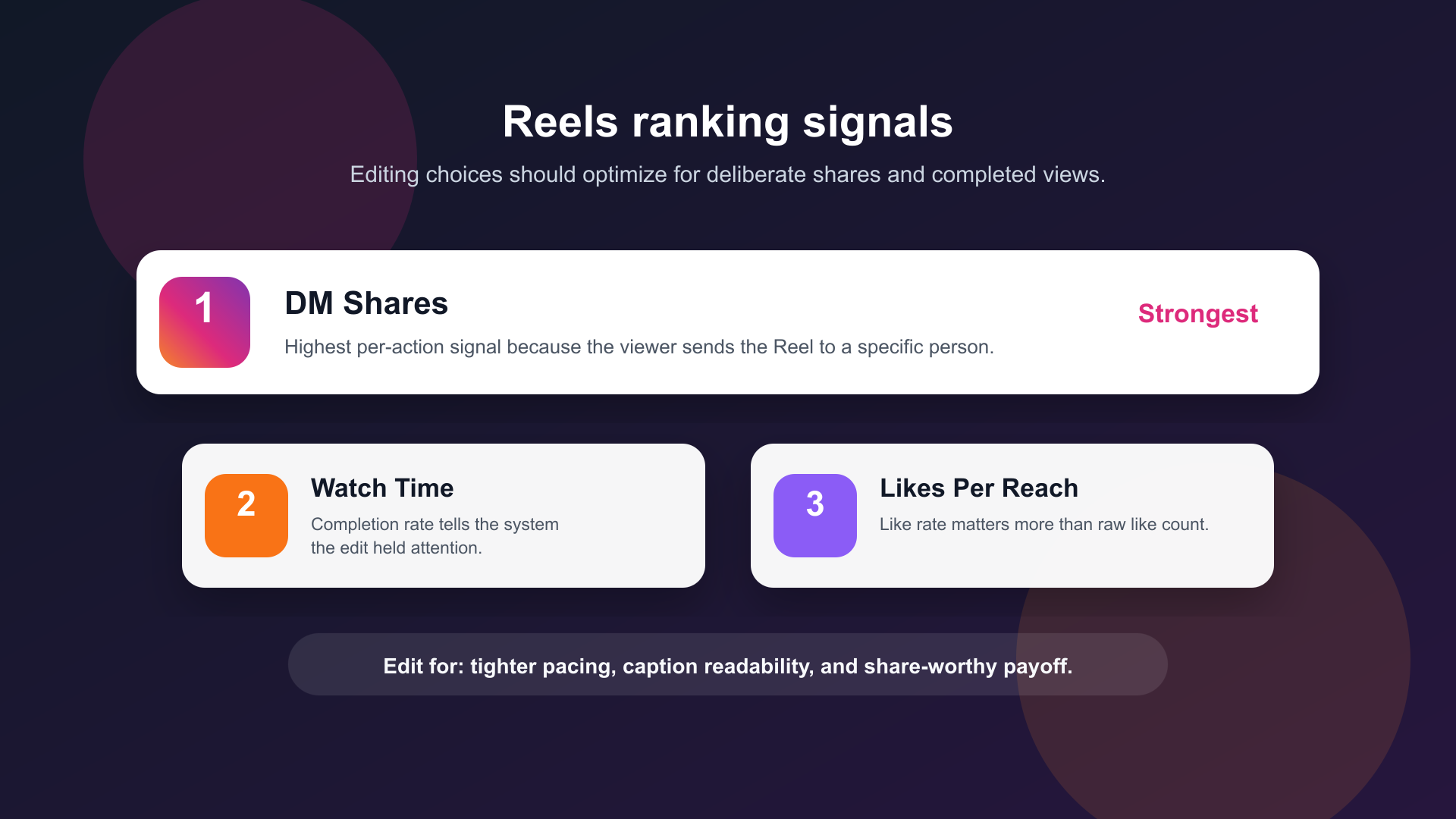
The three primary Reels ranking signals confirmed by Mosseri. DM shares to non-followers have the highest per-action weight.
How Instagram Distributes Reels
Instagram uses two separate distribution systems:
1. Following feed — Reels from accounts you follow, mixed into the main feed. Guaranteed some distribution to your existing audience. This is your initial seeding pool.
2. Recommended content — Reels from accounts you don't follow, appearing in Explore, the Reels tab, and mixed into feeds. This is where growth happens. The algorithm decides what enters this system based on signals from the following-feed seed.
The Core Ranking Signals
1. Watch Time and Completion Rate
Completion rate is the foundation. A Reel that most viewers watch to the end is one the algorithm considers worth spreading further.
If 1,000 people start your Reel and 700 watch to the end, your completion rate is 70% — a strong signal. If only 200 finish, distribution slows regardless of your like count.
What drives completion rate:
- Strong hook in the first 3 seconds — answers "why should I watch this?"
- Silence and dead air removed — every pause is a scroll opportunity
- End when the point is made — don't continue past the payoff
- Captions for the 85% of viewers watching without sound
2. DM Shares (Especially to Non-Followers)
A Reel shared to someone's DMs by a non-follower is the algorithm's highest-confidence quality signal per action. It requires deliberate intent — the viewer matched your content to a specific person.
What drives DM shares:
- Highly relatable content that makes viewers think "I have to send this to [specific person]"
- Surprising or genuinely useful information
- Niche humor that resonates within a specific community
- Content that names a specific problem a friend has
DM-shareable content is usually short enough to consume on the spot (under 30 seconds) and delivers a clear, standalone payoff — no prior context needed.
3. Likes Per Reach
The algorithm doesn't look at raw like count — it looks at like rate: likes divided by impressions. A Reel with a 5% like rate from 10,000 impressions outperforms one with 500 likes from 100,000 impressions (0.5% rate), even though the raw numbers look similar.
What drives higher like rates:
- A clear emotional payoff at the end
- Content that delivers exactly what the hook promised
- An explicit but non-pushy CTA ("double tap if you agree")
4. Saves
Saves signal that someone found the content worth returning to — evergreen, reference-worthy content. Strong for educational formats.
Content that drives saves:
- Step-by-step tutorials people want to reference later
- Lists, frameworks, and templates
- Any "I'll need this" information
5. Comments (Especially Early)
Comments signal engagement depth. The speed at which comments arrive matters — a Reel that gets 20 comments in the first hour signals strong early engagement and gets expanded distribution.
Signals That Hurt Reach
Reposted content with watermarks. CapCut/TikTok watermarks are detected and content is suppressed. Always export clean (no watermark). BlitzCut, Descript, Final Cut Pro, and iMovie all export without watermarks.
Editing after publishing. Finalize captions, hashtags, and cover image before posting. Post-publish edits reset engagement signals.
Low early engagement. The algorithm tests each Reel on your followers first. Low completion rate in that test group means no recommended distribution.
Horizontal video letterboxed to 9:16. Detected as low-effort repurposing. Film vertical or reframe properly before export.
Content flagged "Not interested." Fast skips and "Not interested" reports actively penalize further distribution.
Editing Workflow for Reels Performance
A step-by-step editing workflow that targets the algorithm signals:
Step 1: Silence Removal → Tight Pacing
Silence removal closes every pause longer than 0.3–0.5 seconds. Fast pacing directly increases completion rate — viewers don't have a beat to swipe during dead air.
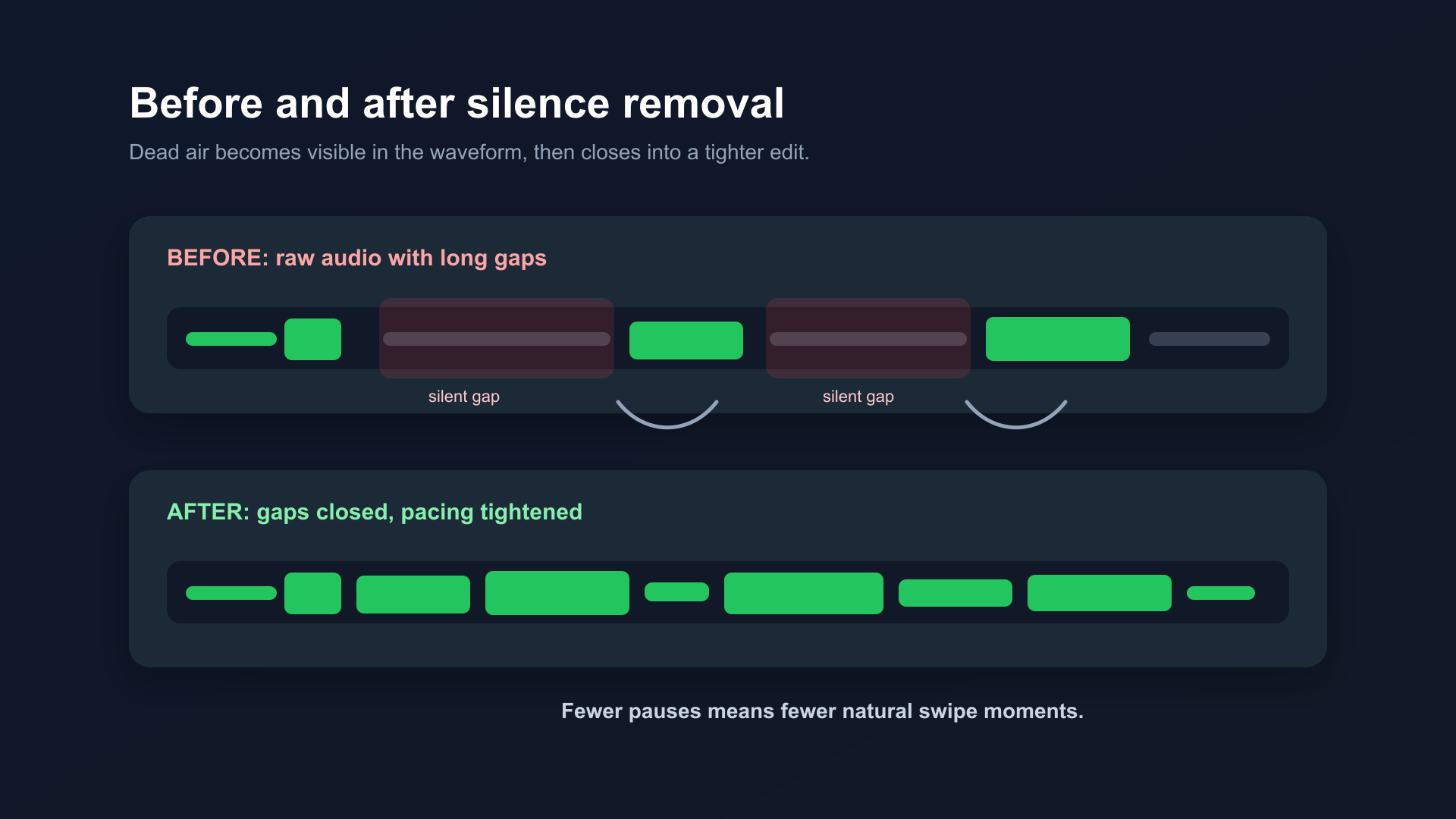
Before and after silence removal. Dead air closed, pacing tightened. Completion rate improves because there are fewer natural swipe moments.
Tools: BlitzCut (Mac/iPhone, on-device, under $6/month annual), Descript ($24/month), CapCut Smart Cut (free).
Step 2: Filler Word Removal
"Um," "uh," "you know" slow delivery and give viewers a reason to swipe. Remove them via transcript editing (BlitzCut, Descript) or AI auto-removal (CapCut).
Step 3: Captions → Retain Muted Viewers
85% of Instagram video is watched without sound. Captions keep that audience. Word-by-word animated captions (karaoke style) perform best — each word appearing in sequence creates a visual engagement loop that reduces swipe-away probability.
Position captions in the lower third, with 15% margin from the bottom — Instagram's UI (like/comment/share buttons) covers the bottom 20–25% of the frame on most phones.
Step 4: Check the Safe Zone
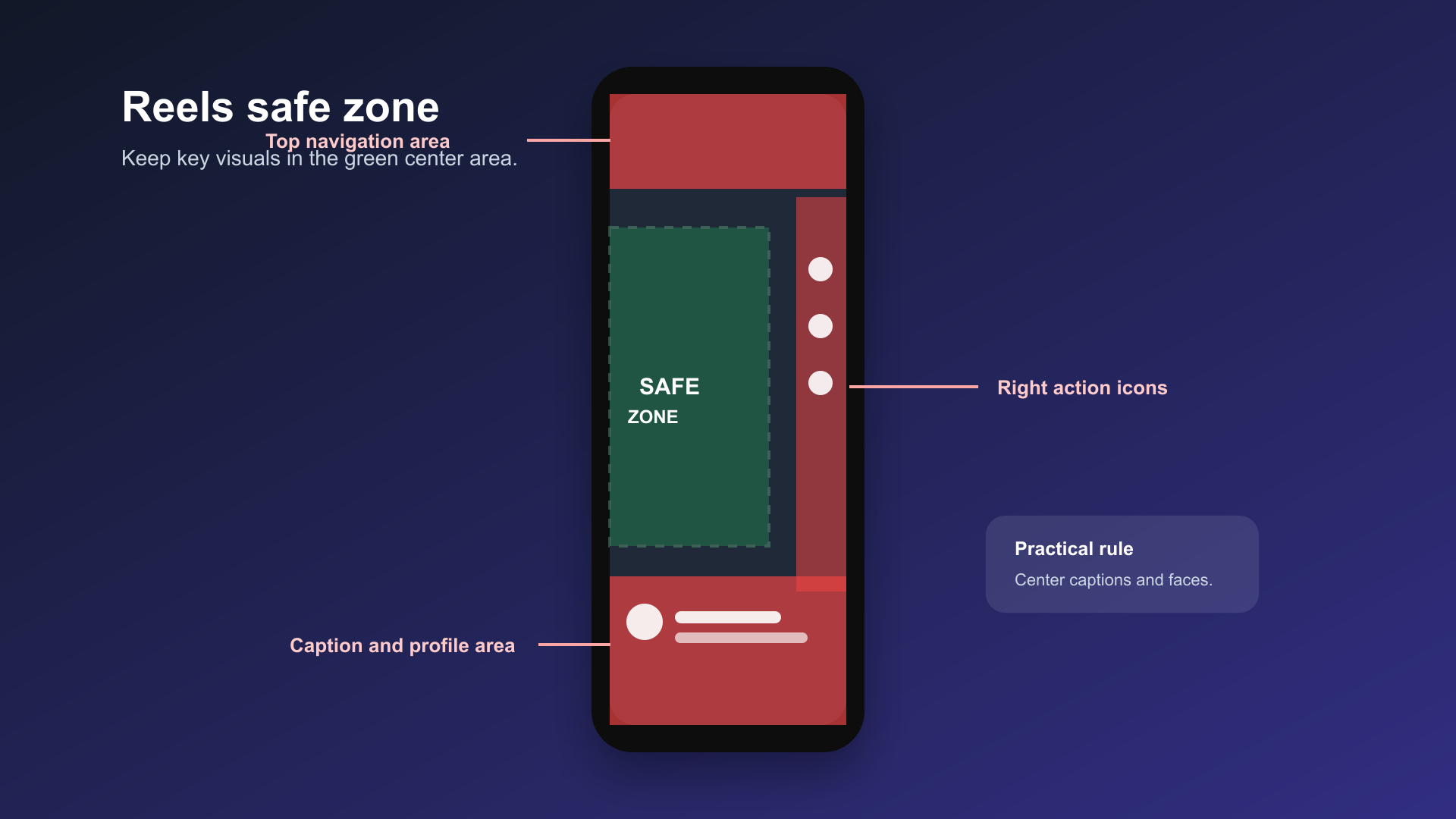
Safe zone for Reels. Keep faces, captions, and key visuals in the middle 60% of the frame. UI elements at top and bottom will obscure content placed too close to edges.
Keep all key visuals, text, and your face in the center 60% of the frame. See Safe Zones for YouTube Shorts, Reels, and TikTok for detailed measurements.
Step 5: Export Specs
- Resolution: 1080×1920 (9:16)
- Frame rate: 30fps
- Format: H.264 MP4
- No watermark
- Audio: stereo, 44.1kHz
Upload directly via the Instagram app. First-party uploads get a small initial distribution boost in most creator reports.
Posting Frequency and Timing
Frequency: 4–7 Reels per week for growth-focused accounts. Quality matters more than volume, but more posts create more chances for a breakout piece.
Posting more than once per day typically reduces per-Reel reach — the algorithm distributes your daily content budget across all posts.
Timing (2026 general benchmarks):
| Window | Best for |
|---|---|
| 7–9am | Morning commute viewing |
| 11am–1pm | Lunch scrolling |
| 7–9pm | Evening main scroll |
These are starting points. Check Instagram Insights for when your specific audience is most active. Your audience's peak hour beats any generic benchmark.
Trending Audio
Trending audio gets a placement boost in the trending audio discovery section. More importantly, it signals cultural currency — content that feels current gets shared more within the niche using that sound.
Don't use trending audio if it's tonally wrong for your content. Forced audio pairing reads as inauthentic and hurts completion rates. Original audio that gets used by other creators signals virality and boosts your original content further.
Frequently Asked Questions
Why do my Reels get 0 reach after the first 100 views?
Low completion rate in the initial seed audience is the most common cause. The algorithm distributes to your followers first — if those viewers swipe away early, it reads the content as low-quality and stops expanding. Focus on the first 3 seconds. If your existing followers aren't finishing it, a broader audience won't either.
Do hashtags still matter for Reels reach in 2026?
Less than before. Hashtags contribute to discoverability in Search, not to the feed algorithm. 3–5 relevant niche hashtags add small discoverability in Search but don't affect Reels feed distribution meaningfully. Watch time and DM shares matter orders of magnitude more.
Does posting frequency affect reach per Reel?
Yes. Posting more than once daily dilutes per-post reach on most accounts. The algorithm has a finite daily budget for distributing your content to new audiences — spreading it across 3 daily posts reduces each post's distribution ceiling. Most accounts perform best at 1 Reel per day or slightly less.
Should I use trending audio on Reels?
Yes, when relevant. Trending audio adds a placement boost in the trending audio discovery section. Don't use it if it's tonally wrong for your content — the algorithm rewards genuine engagement signals, not audio hacking.
Why did my Reel perform well once but not again?
Inconsistent performance is normal. Each Reel gets an independent evaluation. One strong Reel doesn't guarantee the next performs — but it does grow your follower base, which improves your first-hour engagement baseline and makes future Reels more likely to get expanded distribution.
Related: Add Captions to Instagram Reels Automatically · Best Reels Length for Reach · Instagram Reels vs TikTok · Safe Zones for YouTube Shorts, Reels, and TikTok · Instagram Edits App 2026
Last Updated: September 30, 2026 Category: Platform Strategy
Post every day without spending hours editing
BlitzCut is a native app for iPhone, iPad, and Mac. Get from raw footage to TikTok-ready in under 2 minutes, so editing is never the reason you didn't post.
Try it for freeRelated Articles
Keep Reading

Best Adobe Premiere Rush Alternatives (2026): Where to Go Before It Shuts Down
Premiere Rush support ends September 30, 2026. The best alternatives for Mac, iPhone and Android — including Adobe's own replacement — and how to migrate.

Best AI Clipping Tools, Rated by What Users Actually Say (2026)
Best AI clipping tools compared on independent user reviews, billing complaints, and pricing: Vizard, OpusClip, Klap, Quso, and BlitzReels. Plus OpusClip alternatives.

Best AI Video Editor for iPhone (2026): 8 Apps Ranked
The best AI video editor for iPhone and iOS in 2026: 8 apps ranked by captions, silence removal, speed, and price for TikTok, Reels, and Shorts.