
Best Caption Size for TikTok in 2026 (Exact Numbers)
Best caption size for TikTok: 60–75px at 1080×1920. Too small = viewers squint; too big = blocked video. Exact numbers and safe zone measurements.


Caption size on TikTok is one of those settings creators set once and never revisit — even though it directly affects how many viewers follow the video versus tap away. Too small and you lose the 70–80% of viewers watching without sound. Too big and your captions block the content they are supposed to support.
This guide covers the exact font sizes that work at 1080×1920, the safe zone measurements that keep captions clear of TikTok's UI buttons, and why the size that looks right on your desktop monitor will often look wrong on the phone your audience is actually using.
The Direct Answer: Best Caption Size for TikTok
For a 1080×1920 (9:16) vertical video:
| Use case | px | % of frame height | em (16px base) |
|---|---|---|---|
| Minimum readable | 48–55px | ~2.5–2.9% | 3em–3.44em |
| Standard talking-head / educational | 60–75px | ~3.1–3.9% | 3.75em–4.69em |
| Hype / motivation / fitness content | 75–95px | ~3.9–4.9% | 4.69em–5.94em |
| Hard maximum (before blocking video) | 100px | ~5.2% | 6.25em |
| Text block zone (all lines combined) | 12–20% of frame height | — | 230–384px tall |
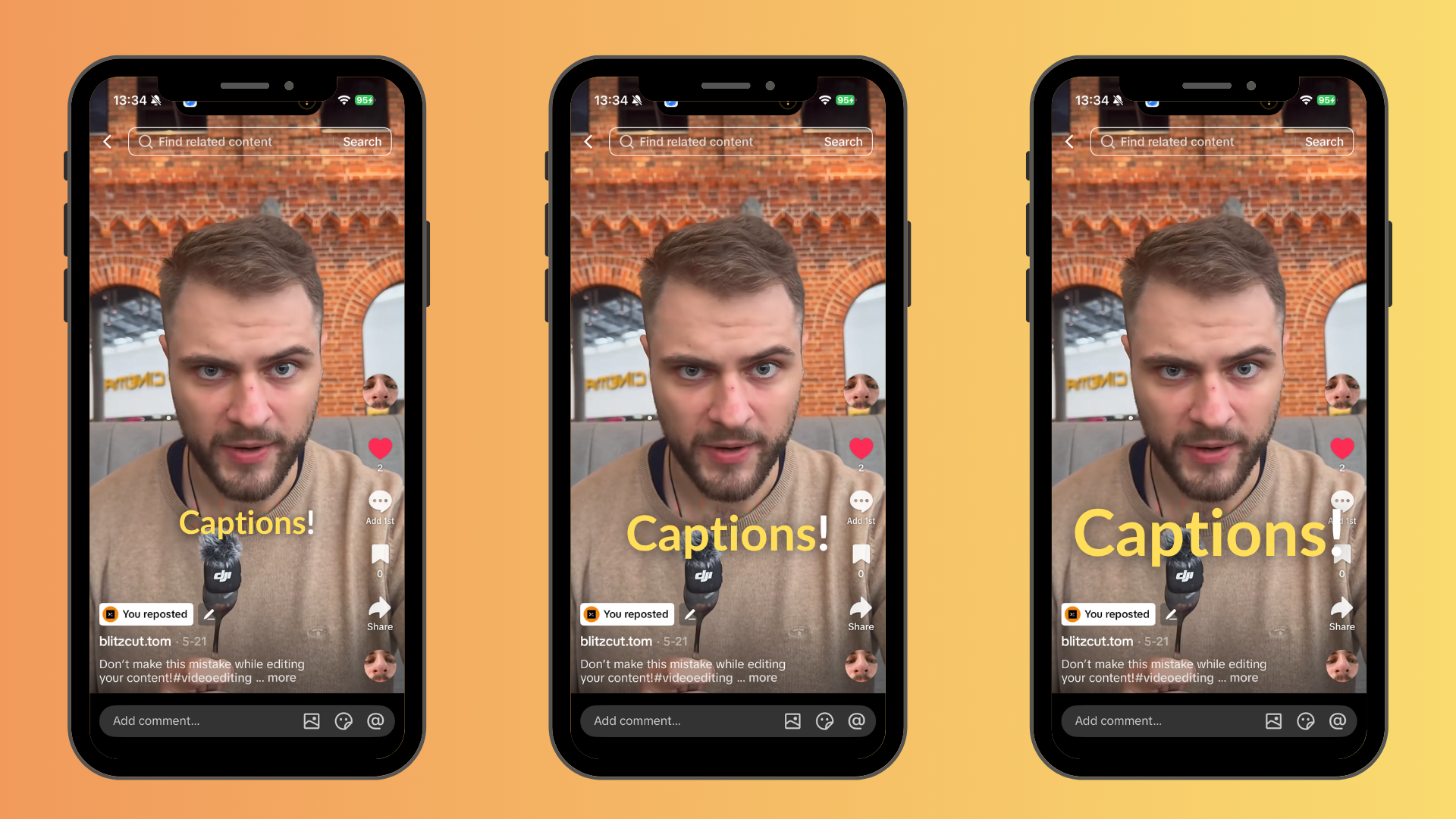
At 1080×1920, the difference between 48px and 65px is small on a monitor but significant on a phone at arm's length. The 60–75px range is readable in a passive scroll environment.
The sweet spot for most creators is 60–75px at 1080×1920. This size is comfortably readable on a 6-inch phone screen held at arm's length without dominating the frame.
Why Caption Size Is a Mobile-First Problem
Most creators edit video on a Mac or desktop setup. On a 27-inch monitor, a 40px caption looks perfectly fine. On a 6.1-inch iPhone 16 screen held at arm's length, that same caption is borderline unreadable.
The math: a 1080×1920 video displayed on a 6.1-inch phone occupies approximately 2.8 inches of vertical height in a 9:16 window. At 40px, each character is roughly 0.06 inches tall — smaller than a standard printed footnote, viewed at two feet distance, in motion.
The test that catches size errors: Export your video, send it to your phone, play it with sound off at arm's length in portrait mode. If you have to shift focus deliberately to read the captions, the size is too small. This test catches the majority of caption size mistakes that desktop-preview editing misses.
Exact Measurements at 1080×1920
Minimum Readable Size: 48–55px
Below 48px at 1080×1920, captions start losing viewers who are not actively trying to read them. In a passive scroll environment — thumb hovering, ready to swipe — a viewer will not strain to read a small caption. They will swipe.
48–55px is the minimum for any content where captions carry meaning. It is acceptable for secondary information (timestamps, source credits, supplementary text) but is below the recommended range for primary caption dialogue.
Optimal Range: 60–75px
This range is the recommendation from caption tool vendors, creator guides, and platform documentation consensus. At 60–75px:
- Readable on any modern smartphone at standard viewing distance
- Does not dominate the frame in standard talking-head or educational content
- Fits 2–4 lines of text within the safe zone without crowding
- Works for word-by-word (karaoke) or short-phrase caption styles
For content where the speaker's face is the primary visual element, 60–75px keeps captions legible without competing with the face.
Hype and High-Energy Content: 75–95px
Fitness, motivation, sports, and fast-cut content use larger captions as a deliberate design signal. Bigger text matches the energy of the content — it reads as bold, direct, and high-stakes. The Hormozi-style ALL CAPS caption typically runs at 80–90px in its most recognizable form.
At this size range, the text block becomes a visual element in itself, not just a reading aid. The tradeoff is that it occupies more of the safe zone and leaves less room for footage.
Hard Maximum: 100px / 20% of Frame
Beyond 100px or when the caption block exceeds 20% of the frame height (384px at 1920px tall), captions start blocking the video in ways that feel accidental rather than intentional. On fast word-by-word sequences, oversized text creates flicker. On slower content, it reads as amateurish.
100px is a hard ceiling for standard caption use. The exception is intentional large-text graphic design — title cards, hook statements, overlaid quotes — where the text IS the content rather than a transcription layer.
Caption Size Across Platforms: TikTok vs. Reels vs. YouTube Shorts
All three platforms use 1080×1920 (9:16), so the raw pixel dimensions for optimal font size are identical. The difference is in UI dead zones, which affects where captions can sit rather than how large they should be.
| Platform | Optimal font size | Bottom dead zone | Right dead zone |
|---|---|---|---|
| TikTok | 60–75px | 320–350px from bottom | 120–164px from right |
| Instagram Reels | 60–75px | 310–450px from bottom | 120px from right |
| YouTube Shorts | 60–75px | 300px from bottom | ~48px from right |
Key takeaway: Caption size does not change between platforms — 60–75px works across all three. Caption position must account for each platform's different dead zones (covered in the placement guide).
If you are posting the same file across TikTok, Reels, and Shorts, size your captions at 60–75px and keep them in the cross-platform safe zone of approximately 900×1400px centered in the 1080×1920 frame.
Font Weight and Its Relationship to Size
Caption size and font weight work together. A 70px caption in a thin 300-weight font is less readable than a 55px caption in a bold 700-weight font. The readability research confirms: bold fonts (weight 700–900) score 31% better on mobile readability tests compared to medium-weight fonts at the same size.
The practical implication: you can use smaller pixel sizes if you increase font weight. A 55–60px Montserrat Black (weight 900) is more readable than a 75px Montserrat Light (weight 300).
The combination that works: Bold weight (700–900) + 60–75px size + black outline. All three together. Removing any one element reduces readability more than the individual contribution suggests.
How Many Words Per Caption Block
Caption size interacts with how many words appear simultaneously:
Word-by-word (karaoke) style: 1–3 words per frame, which means the text block is sparse and larger sizes work without crowding. 70–90px is natural here.
Short-phrase style: 3–7 words per frame. At 60–75px, a 7-word line fits within the safe zone horizontally. Beyond 8 words at 70px, lines either wrap awkwardly or get truncated.
Full-sentence style: 8–15 words per frame. This requires either smaller text (50–60px) or a two-line layout. At 70px, a 15-word sentence takes two lines and occupies a large portion of the safe zone.
The modern TikTok caption convention — short-burst word-by-word or short-phrase — naturally accommodates larger text sizes because fewer words are on screen at once.
The "Preview on Phone" Rule
The single most impactful change most creators can make to their caption workflow: preview every video on an actual phone before posting.
Desktop editing environments (Final Cut Pro, Premiere Pro, DaVinci Resolve, even web editors at 100% zoom) display video at a size significantly larger than the phone screen your audience uses. What looks readable at 50px on a 27-inch 4K monitor is not readable at 50px on a 6.1-inch phone.
The workflow:
- Export a test render
- AirDrop or send to your phone
- Play it with sound off, at arm's length, in natural light
- Read every caption line from that position
- If any line requires focus to parse, increase size by 10px and re-test
This adds 3–5 minutes to the workflow and catches the caption size mistakes that account for a significant share of low watch time on otherwise good content.
Caption Size in BlitzCut
BlitzCut generates captions from the edited transcript. The karaoke, bold center, and standard caption styles are pre-configured for the 1080×1920 format. The word-by-word timing is derived from the transcript, so timing accuracy is maintained regardless of the size configuration.
For Mac creators exporting in 9:16 for TikTok, Reels, or Shorts: BlitzCut's export in that aspect ratio applies the caption layout correctly without manual size adjustment per platform.
Frequently Asked Questions
What font size should I use for TikTok captions? 60–75px at 1080×1920 is the optimal range for standard talking-head and educational content. Use 75–95px for high-energy or motivational content. The minimum for any caption that carries meaning is 48px.
Why do my TikTok captions look fine on my computer but small on my phone? Desktop monitors display video at a much larger physical size than phone screens. A 50px caption on a 27-inch monitor appears significantly larger than the same 50px caption on a 6-inch phone at arm's length. Always preview on an actual phone before posting.
Is caption size the same for Instagram Reels and YouTube Shorts? Yes — all three platforms use 1080×1920, so the same 60–75px range applies. The difference is in safe zone dead zones, not caption size itself.
What is the maximum font size for TikTok captions? Approximately 100px or 20% of frame height (384px at 1920px). Beyond this, captions begin blocking the video in ways that feel unintentional rather than designed.
Does bigger always mean more readable? Not beyond the 100px ceiling. At oversized ranges, word-by-word caption sequences create visual flicker, and full-phrase captions start dominating the frame. Bold font weight (700–900) paired with 60–75px size is more readable than thin font weight at 90px.
Should I use the same caption size for TikTok as for YouTube Shorts? Yes. Both platforms use 1080×1920. Caption size is identical. The only difference is safe zone positioning — YouTube Shorts has a narrower right-side dead zone than TikTok.
Related: Best Caption Size for Instagram Reels 2026 · Best Caption Size for YouTube Shorts 2026 · Best Caption Colors for TikTok · Best Caption Placement for Short-Form Video · TikTok Caption Trends 2026
Post every day without spending hours editing
BlitzCut is a native app for iPhone, iPad, and Mac. Get from raw footage to TikTok-ready in under 2 minutes, so editing is never the reason you didn't post.
Try it for freeRelated Articles
Keep Reading

Best Adobe Premiere Rush Alternatives (2026): Where to Go Before It Shuts Down
Premiere Rush support ends September 30, 2026. The best alternatives for Mac, iPhone and Android — including Adobe's own replacement — and how to migrate.

Best AI Clipping Tools, Rated by What Users Actually Say (2026)
Best AI clipping tools compared on independent user reviews, billing complaints, and pricing: Vizard, OpusClip, Klap, Quso, and BlitzReels. Plus OpusClip alternatives.

Best AI Video Editor for iPhone (2026): 8 Apps Ranked
The best AI video editor for iPhone and iOS in 2026: 8 apps ranked by captions, silence removal, speed, and price for TikTok, Reels, and Shorts.