
Best TikTok Caption Fonts: What Top Creators Use (2026)
The best TikTok caption fonts are Montserrat Bold, Poppins, and Bebas Neue. See 9 fonts top creators use, with exact sizes, colors, and animations.


The best TikTok caption fonts are heavy sans-serifs, and Montserrat Bold (Montserrat Black for the Hormozi look) is the one most top creators use: white text, a thick black outline, and word-by-word animation. TikTok's default caption font is TikTok Sans (here's the full answer), but creators swap it for bolder fonts that read faster in the feed.
This guide covers the best fonts for TikTok captions and subtitles, what each one suits, and the exact size, color, and animation settings to use. BlitzCut includes these caption fonts as ready-made presets.
Quick Picks
| Font | Best for | Free? |
|---|---|---|
| Montserrat Bold / Black | Business, education, tutorials (best overall) | Yes, Google Fonts |
| Poppins | Lifestyle, beauty, travel | Yes, Google Fonts |
| Proxima Nova | Tech, SaaS, startup content | No, paid license |
| Bebas Neue | Fitness, motivation, sports | Yes, Google Fonts |
| Roboto | News, explainers, stats | Yes, Google Fonts |
| Archivo Black | Hot takes, one-line statements | Yes, Google Fonts |
| Anton | Free Hormozi-style alternative | Yes, Google Fonts |
| TikTok Sans | A native TikTok look | Yes, Google Fonts |
| Inter | Minimal, aesthetic content | Yes, Google Fonts |
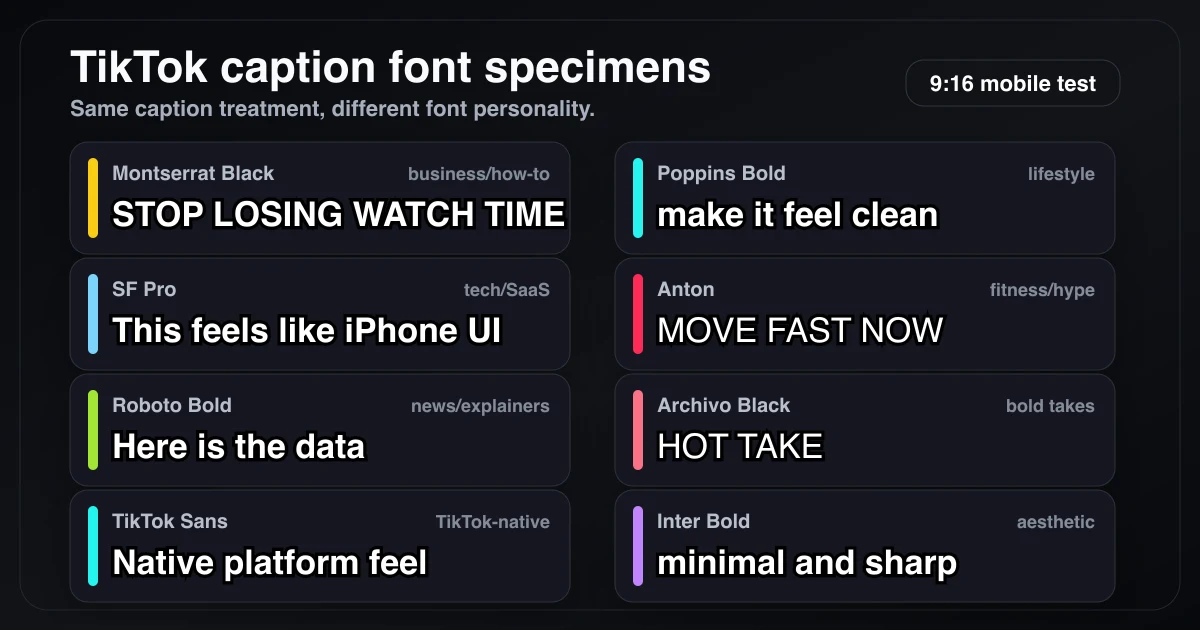
The same caption treatment rendered across the main TikTok caption font styles. The differences are easiest to judge at mobile size, where weight and width matter more than font trivia.
Try it yourself: type your own caption into our free Caption Font Previewer and compare all of these fonts at phone size, with outline, pill, and highlight styles.
Why Your TikTok Caption Font Matters
Most people scroll TikTok with the sound off or low, so the caption is what carries the video. Your font decides two things in the first second:
- Can they read it? Thin, condensed, or script fonts blur at phone size and in motion.
- What kind of video is this? Fonts set expectations before anyone reads a word.
- Heavy, blocky fonts read as business, motivation, or hype
- Clean, minimal fonts read as aesthetic or lifestyle
- Rounded fonts read as friendly and casual
- Handwriting fonts read as personal, but only work for a few words
What the Research Says About Captions
- 69% of people watch video with the sound off in public, and 80% say they're more likely to finish a video when it has captions (Verizon Media and Publicis Media, survey of 5,616 US adults, 2019, Forbes coverage)
- On-screen captions in TikTok ads produced +58% recall and +31% likeability (TikTok Marketing Science, US SMB Creative Effectiveness Study 2021, conducted by Lumen)
- Captions increased video view time by 12% in Facebook's internal testing of video ads (Facebook, via 3Play Media)
- Captioned YouTube videos got 7.32% more views than uncaptioned ones in a controlled test (Discovery Digital Networks case study)
- About 80% of caption users aren't deaf or hard of hearing (Verizon Media, via Streaming Media)
These numbers are about captions in general. How much the font itself matters comes down to legibility, covered in the settings section below.
The Best TikTok Caption Fonts
1. Montserrat Bold - Best Overall
Use for: Business, education, how-to, tutorials
Montserrat is the default choice for talking-head TikToks. Its wide letterforms stay legible at small sizes, it comes in every weight from Thin to Black, and it's free on Google Fonts. It's also the standard free substitute for Proxima Nova, the font behind TikTok's "Classic" text style, so it looks at home in the feed.
Best settings:
- Size: 60-75px at 1080×1920
- Color: White with a thick black outline
- Animation: Word-by-word pop
The Hormozi spec: Alex Hormozi's videos use a font called "The Bold Font". Montserrat Black (900 weight) is the closest free match most creators use. To get the full look:
- ALL CAPS, 3-5 words per line
- One keyword per line highlighted in yellow (#f7c204), red, or green (#02fb23)
- Heavy black outline or shadow on all text
- Words pop in timed to speech
It works because the viewer's ears and eyes get the same message at the same moment, and the highlighted word gives the eye something to land on every beat.
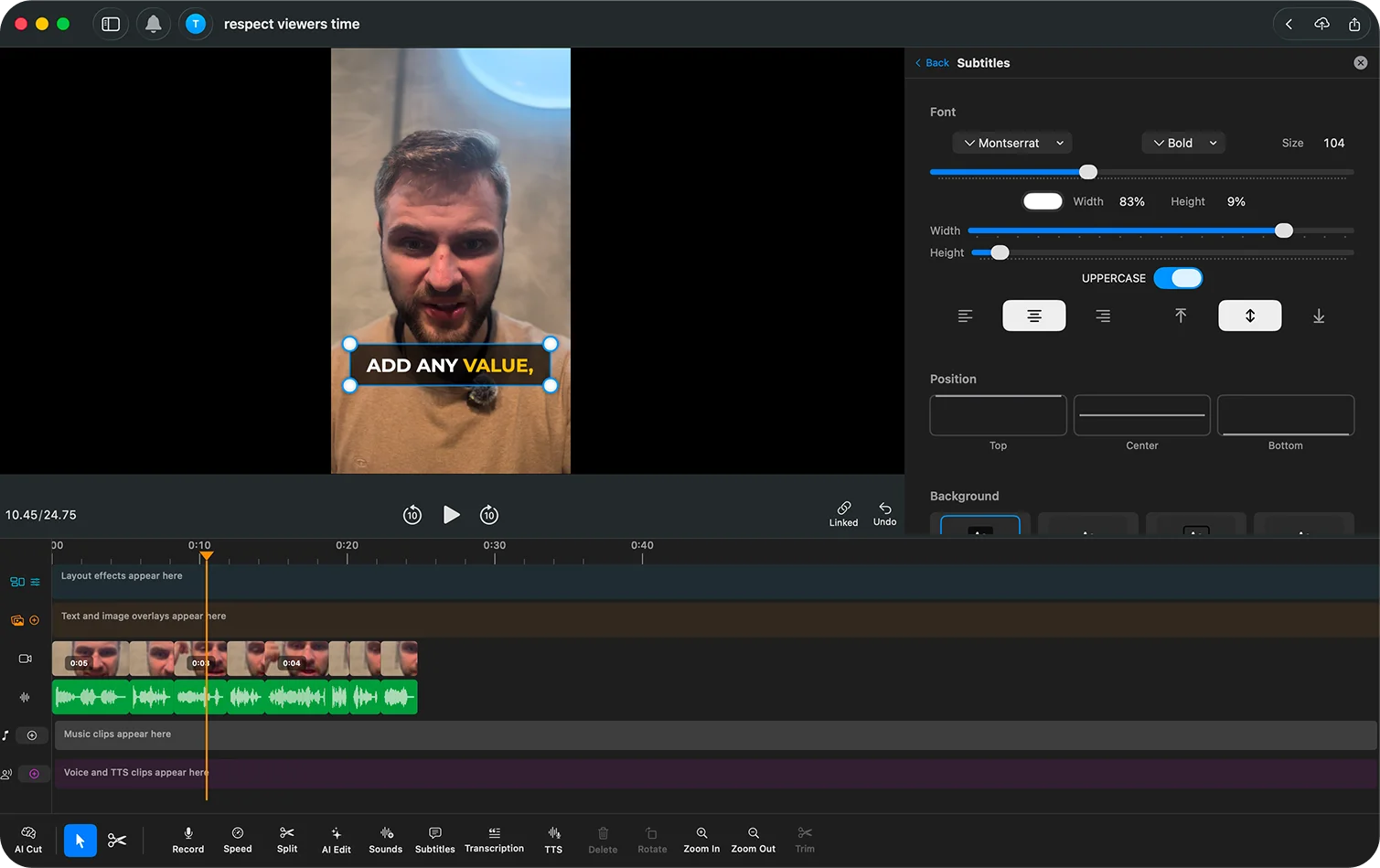
BlitzCut's Hormozi preset sets the font, outline, highlight, and animation in one tap. Full breakdown: Alex Hormozi Captions Style.
2. Poppins - Best for Clean Aesthetic
Use for: Lifestyle, fashion, beauty, travel
Poppins is geometric with slightly rounded shapes, so it feels friendly without looking childish. It stays readable at medium sizes and doesn't fight with the footage, which is what you want when the visuals are the point.
Best settings:
- Size: 55-65px
- Color: White with a subtle shadow
- Animation: Fade in, no bounce
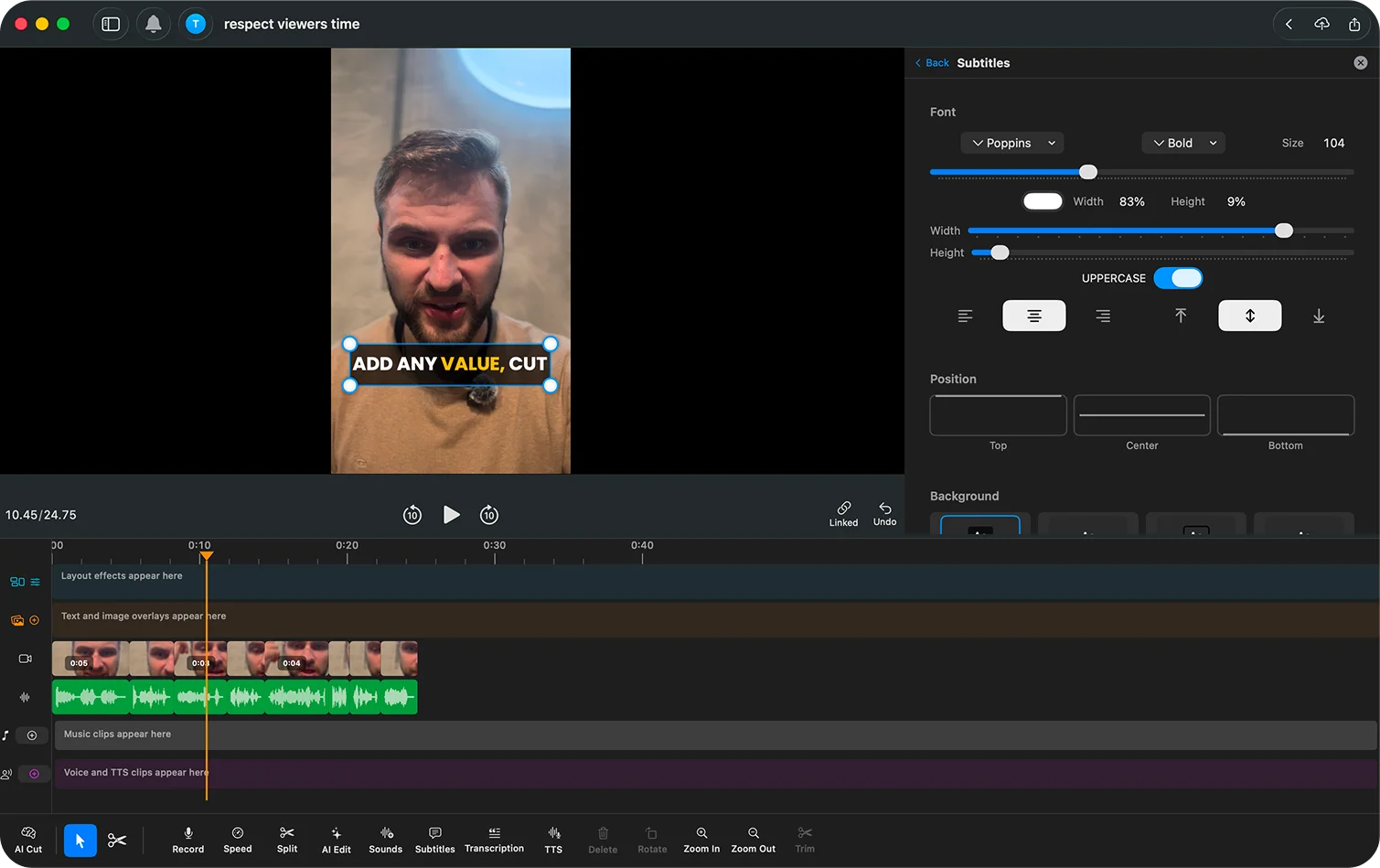
3. Proxima Nova - Best for Tech/Startup
Use for: Tech reviews, SaaS demos, startup content
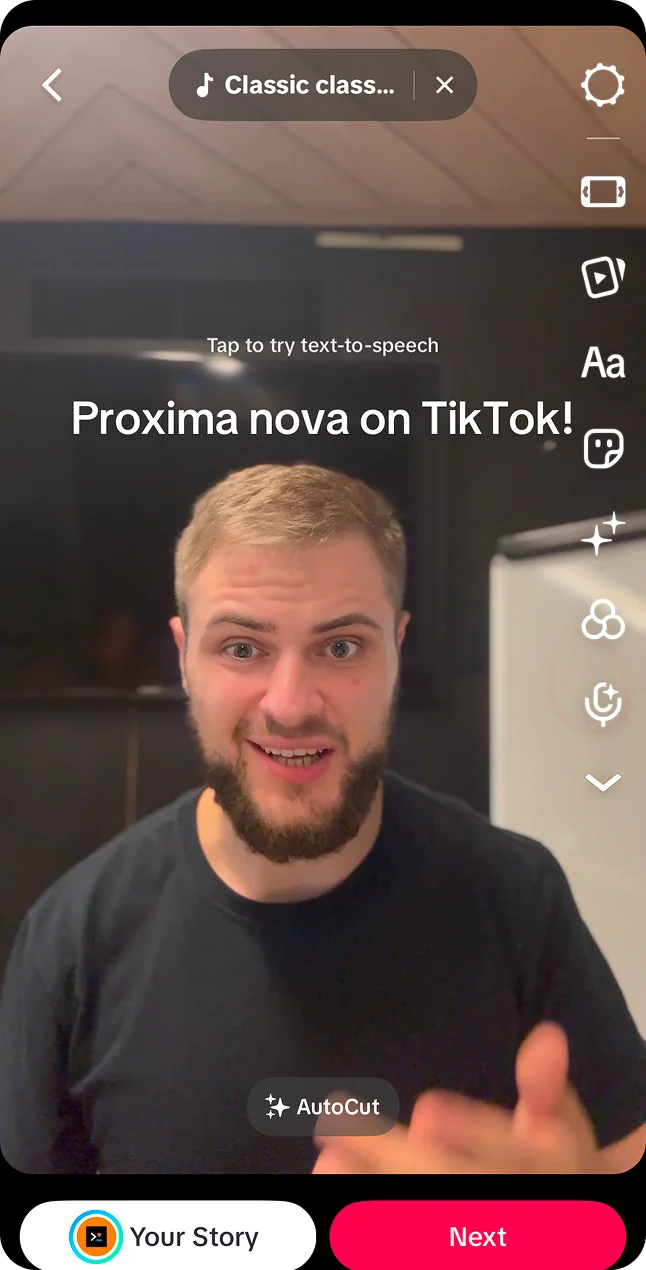
Proxima Nova was TikTok's own font until 2023 and it's still the "Classic" style in the in-app text tool. It looks modern, neutral, and trustworthy. The catch: it's a paid commercial font. If you don't want to buy it, use Montserrat.
You'll also see SF Pro (Apple's system font) suggested for this look. Apple's license only covers mockups of apps for Apple platforms, so don't use it in published videos.
Best settings:
- Size: 60-70px
- Color: White with a thin black outline
- Animation: Minimal or none
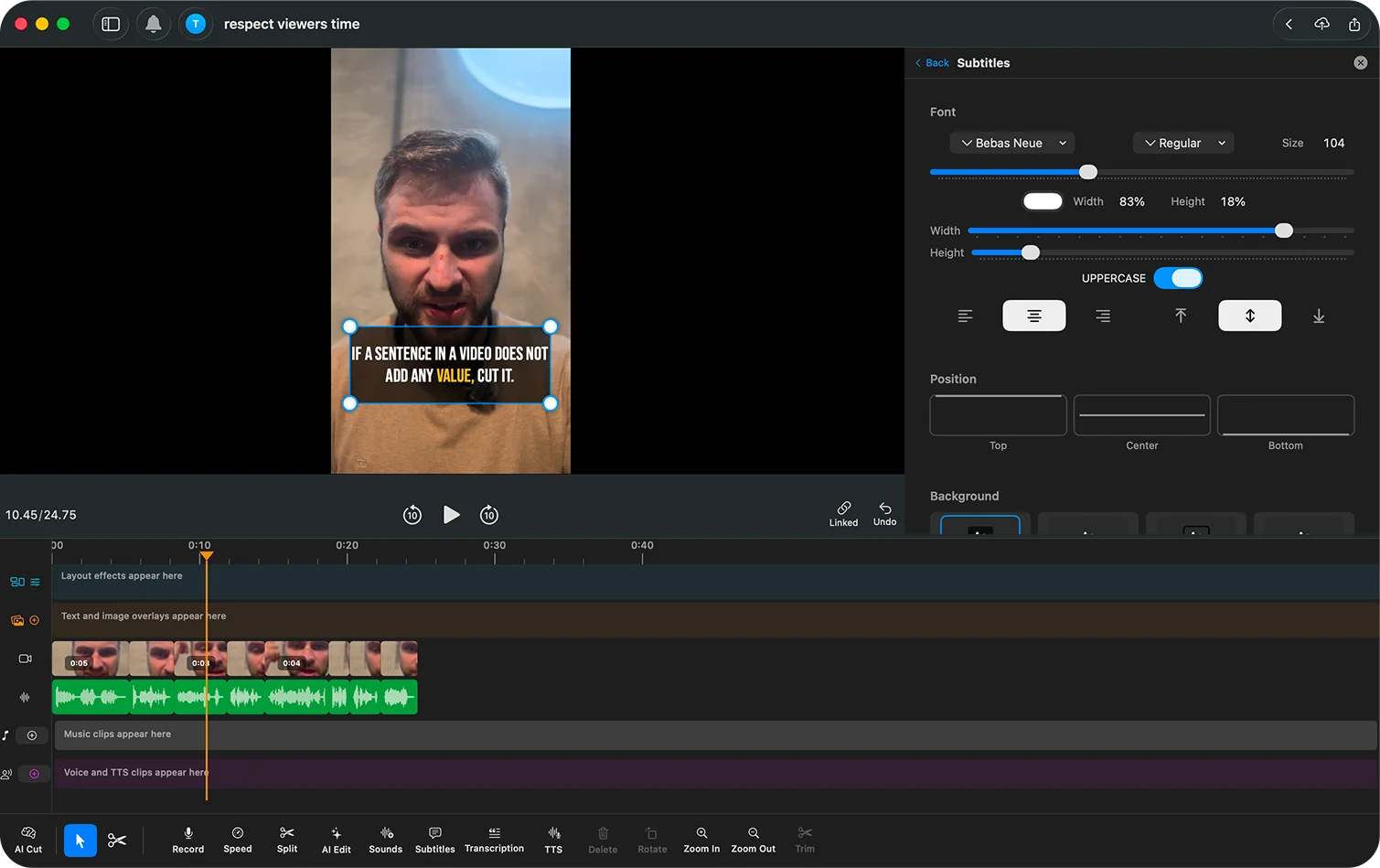
4. Bebas Neue - Best for Hype/Energy
Use for: Fitness, motivation, sports, challenges
Bebas Neue is all caps and condensed, so you can fit more words per line at a larger size. It looks loud on purpose. Because it's narrow, give it a thick outline so the letters don't blur together.
Best settings:
- Size: 75-95px
- Color: Yellow or white, with a black outline
- Animation: Fast bounce
5. Roboto - Best for News/Information
Use for: News commentary, explainers, data and stats
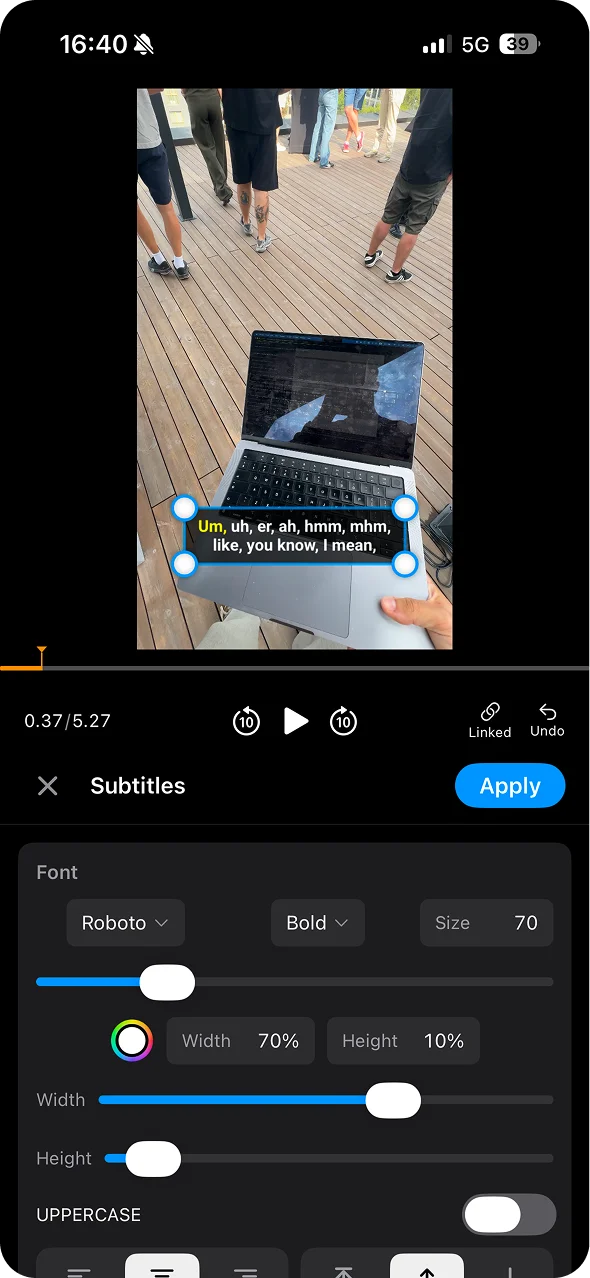
Roboto is Google's Android system font. It's neutral and quick to read, and numbers look clean in it, which matters when your captions are full of stats. Use the Bold or Black weight. Regular is too thin for captions.
Best settings:
- Size: 60-70px
- Color: White on a dark background box, or white with an outline
- Animation: Minimal
6. Archivo Black - Best for Bold Statements
Use for: Hot takes, opinions, one-line hooks
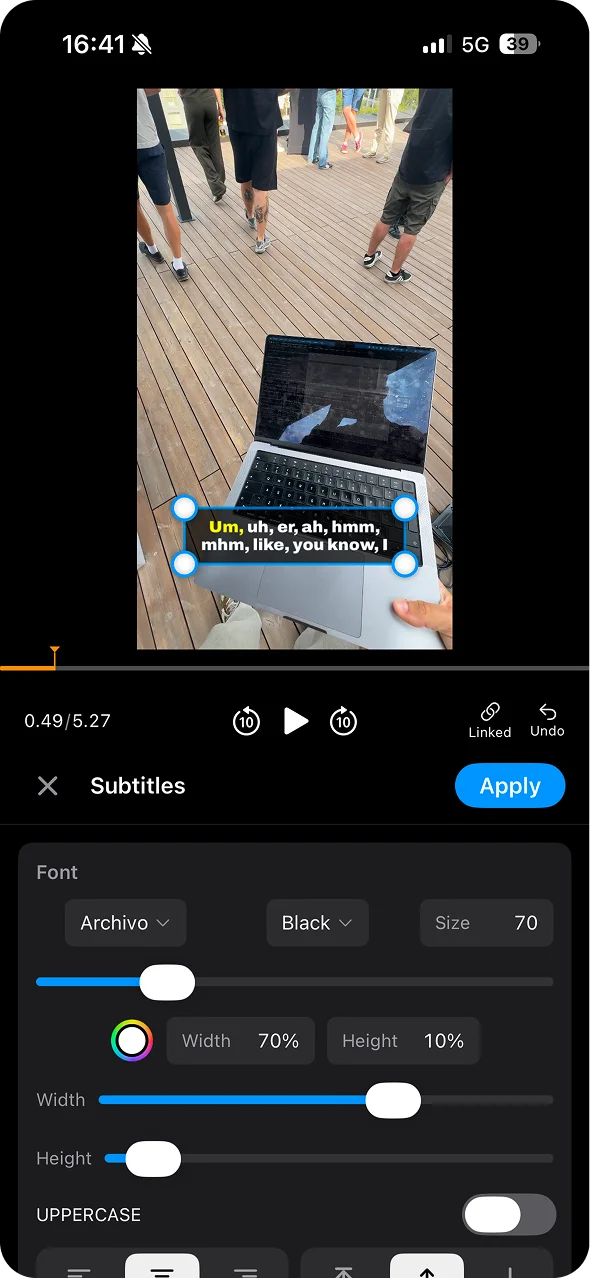
Archivo Black is very heavy and fairly wide. It's too loud for a full minute of captions, but it's perfect for a single hook line in the first two seconds.
Best settings:
- Size: 80-100px
- Color: Yellow or white with a heavy outline
- Animation: Pop or scale
7. Anton - Best Free Hormozi Alternative
Use for: Business, education, motivation, anywhere you'd use Montserrat Black
Anton is a heavy, condensed display font on Google Fonts. It's closer in shape to The Bold Font than Montserrat is, and because it's narrower, more words fit per line. It's free for commercial use under the SIL Open Font License, so monetized videos are fine.
If you want The Bold Font itself, check its license terms before using it in commercial or sponsored content.
Best settings:
- Size: 70-85px, ALL CAPS
- Color: White with a thick black outline
- Highlight: One keyword in yellow (#f7c204)
- Animation: Word-by-word pop
8. TikTok Sans - Best for a Native Look
Use for: Content that should feel native to TikTok
TikTok Sans is TikTok's own typeface. TikTok released it as a free, open-source font in July 2025, and it's what the app's auto-generated captions use. You can download it from Google Fonts and use it in any editor, including BlitzCut.
The tradeoff: text that looks like part of the app is easy to scroll past. Use a heavy weight and an outline so it reads as your caption rather than TikTok's interface.
Best settings:
- Size: 60-75px, Bold or Black weight
- Color: White with an outline
- Animation: Word-by-word or fade
9. Inter - Best for Minimalist Content
Use for: Art, design, aesthetic vlogs, photography
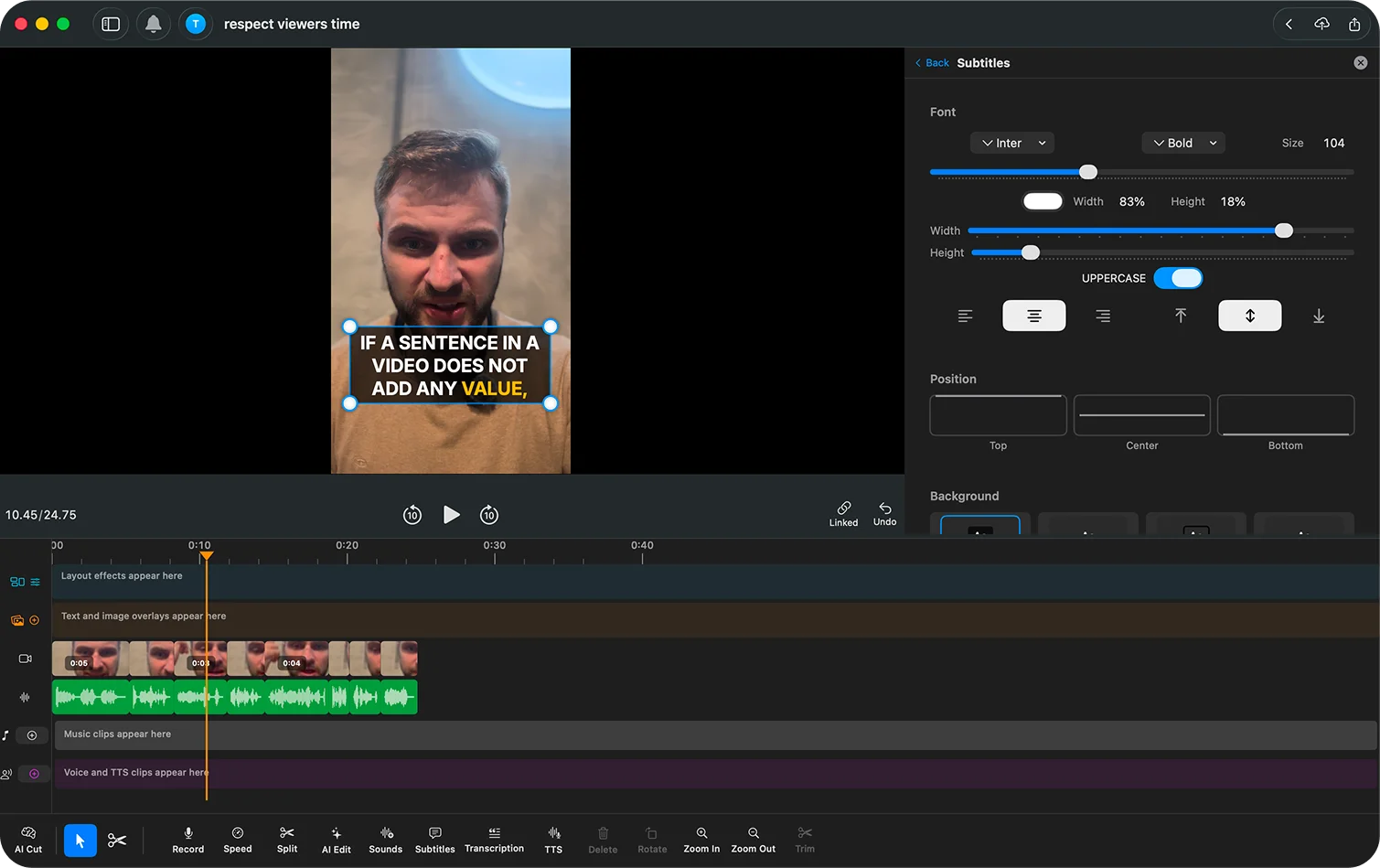
Inter was designed for screens, so it holds up at smaller sizes better than most fonts. Set small and without much styling, it stays out of the way of the footage.
Best settings:
- Size: 50-60px
- Color: White with a light outline or none
- Animation: Simple fade
Best Font by Content Type
| Content Type | Best Font | Style | Animation |
|---|---|---|---|
| Business/Finance | Montserrat Black | White + outline | Word pop |
| Fitness/Sports | Bebas Neue | Yellow + outline | Bounce |
| Beauty/Fashion | Poppins | White + shadow | Fade |
| Tech/Reviews | Proxima Nova | White + outline | Minimal |
| Comedy | Poppins/Inter | Varied colors | Pop |
| Cooking/Food | Poppins | White + outline | Fade |
| Education | Montserrat/Roboto | White + outline | Word pop |
| Lifestyle/Vlog | Inter/Poppins | White/black | Minimal |
| News/Commentary | Roboto | White + outline | Static |
| Art/Design | Inter | Minimal | Fade |
Font Settings That Matter More Than the Font
A well-set average font beats a great font set badly. Five settings do most of the work.
1. Weight
- Thin to Regular (100-400): Hard to read on a phone. Avoid.
- Medium to Semibold (500-600): OK for longer, calmer captions.
- Bold to Black (700-900): The TikTok standard.
2. Width and Case
Legibility research from MIT's AgeLab tested how fast people read words at a glance, which is close to how captions get read mid-scroll. Sawyer et al. (2017) found condensed text took 11.2% longer to read than regular-width text. For one or two words at a glance, uppercase read faster than lowercase. For full sentences, all caps slows reading down.
In practice: condensed fonts like Bebas Neue and Anton need a larger size and a thick outline to make up for their narrow letters. All caps works for short 3-5 word caption chunks, but not for long lines.
3. Outline
White text with a thick black outline (5-8px at 1080×1920) is readable on any background. Thin outlines (2-3px) look cleaner but need darker footage. More on outlines, shadows, and background boxes in caption background vs outline vs shadow.
4. Shadow
A subtle drop shadow (1-2px offset) adds depth. Heavy, blurry shadows look dated.
5. Size
60-75px at 1080×1920 is the range for most talking-head content, with the whole caption block at 12-20% of frame height. Exact numbers for each content type are in best caption size for TikTok.
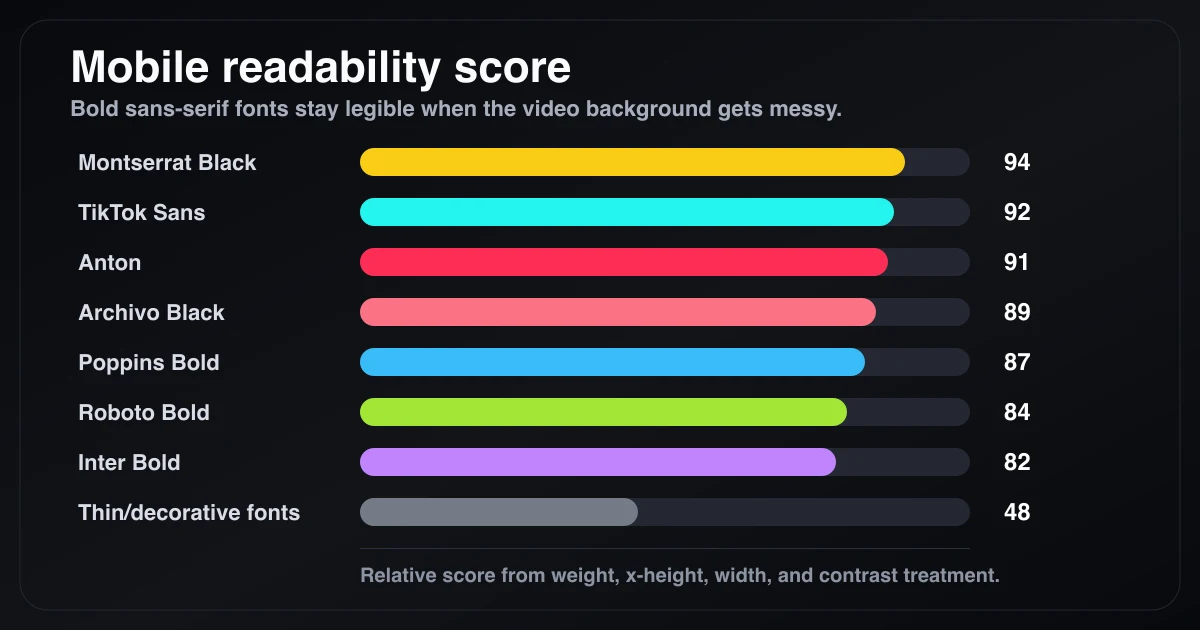
Relative mobile readability by font weight, width, x-height, and contrast treatment. Bold sans-serif fonts give viewers the least friction while scrolling.
Color and animation matter too. See best caption colors for TikTok and animated vs static captions.
Caption Font Mistakes
Too small. If viewers squint, they scroll. Stay at 60px or above for most content.
Low contrast. White text on a bright sky disappears. Always use an outline, shadow, or background box.
Too many fonts. Pick one font per video. Use color or weight for emphasis, not a second typeface.
Script fonts for full sentences. Handwriting and cursive fonts are fine for two or three words, not for a whole caption track.
All caps full sentences. All caps works in short 3-5 word chunks (the Hormozi style). For long sentences it's slower to read, so use sentence case.
A font that doesn't fit the content. A bubbly display font on a finance video undercuts everything you're saying. Use the content-type table above.
TikTok's Built-In Fonts
TikTok's in-app text tool has a handful of styles. The default, Classic, is Proxima Nova Semibold. Auto-generated captions use TikTok Sans. The other styles (Serif, Typewriter, Handwriting, Neon and so on) are fine for short text overlays but limited for full captions: you can't set outline thickness, word-by-word timing, or keyword highlights.
That's why most creators caption in an external editor and upload a finished video. The full history of TikTok's fonts is in What Font Does TikTok Use?
How to Add These Fonts in BlitzCut
BlitzCut works on Mac and iPhone and has these caption fonts built in.
- Import your video. Drag it into BlitzCut on Mac, or tap + on iPhone and pick it from your library.
- Generate captions. BlitzCut transcribes the audio and times every word automatically.
- Pick a style. Start from a preset such as the bold Hormozi style, or choose karaoke for word-by-word highlighting.
- Change the font. Switch to any font from this list, or install a custom one like TikTok Sans. Then adjust size, color, and outline.
- Export. Captions are burned into the video, ready to upload to TikTok.
Download BlitzCut to try it on your next video.
Fonts on Reels and Shorts
The same fonts work on Instagram Reels and YouTube Shorts, but the styling is usually more restrained: semi-bold instead of black weights, less animation, and captions in the lower third. Platform-specific picks:
Frequently Asked Questions
What font does TikTok use for captions?
TikTok's auto-generated captions use TikTok Sans. Text added with the text tool defaults to Classic, which is Proxima Nova. Full history in What Font Does TikTok Use?
What is the best font for TikTok captions?
Montserrat Bold for most talking-head content, or Montserrat Black for the Hormozi look. Poppins suits lifestyle content, and Bebas Neue suits fitness and hype content. All three are free on Google Fonts.
What font do most TikTokers use?
Casual creators mostly use TikTok's built-in Classic style. Creators who caption in an external editor mostly use heavy sans-serifs: Montserrat, Anton, Poppins, or Bebas Neue.
What is the best free font for TikTok captions?
Montserrat. It's free for commercial use, comes in every weight, and is the closest free match to both Proxima Nova and the Hormozi style. Anton is the best free option if you want a more condensed look.
Should TikTok captions be bold?
Yes. Use weight 700 or heavier. Thin fonts break up on small screens and against busy backgrounds. Pair bold white text with a black outline for maximum readability.
How big should TikTok captions be?
60-75px at 1080×1920 for most content, and 75-95px for hype content. Keep the whole caption block within 12-20% of the frame height. Details in best caption size for TikTok.
Can I use TikTok Sans for my captions?
Yes. It's free and open source under the SIL Open Font License, so commercial use is allowed. Download it from Google Fonts and install it like any other font.
Related Guides
- What Font Does TikTok Use? - TikTok Sans, Proxima Nova, and the Classic style
- Best Caption Colors for TikTok - Colors and highlights that read on any background
- TikTok Caption Styles - Popular caption styles with examples
- TikTok Caption Trends 2026 - What's new this year
- Alex Hormozi Captions Style - The style breakdown
Get These Caption Fonts in One Tap
BlitzCut has these fonts built into ready-made caption presets on Mac and iPhone:
- Montserrat Black for the Hormozi style
- Poppins and Inter for clean, minimal captions
- High-contrast colors and outlines
- Sizing tuned for phone screens
- Word-by-word karaoke animation
Download BlitzCut and caption your next TikTok in minutes.
Post every day without spending hours editing
BlitzCut is a native app for iPhone, iPad, and Mac. Get from raw footage to TikTok-ready in under 2 minutes, so editing is never the reason you didn't post.
Try it for freeRelated Articles
Keep Reading

Best Adobe Premiere Rush Alternatives (2026): Where to Go Before It Shuts Down
Premiere Rush support ends September 30, 2026. The best alternatives for Mac, iPhone and Android — including Adobe's own replacement — and how to migrate.

Best AI Clipping Tools, Rated by What Users Actually Say (2026)
Best AI clipping tools compared on independent user reviews, billing complaints, and pricing: Vizard, OpusClip, Klap, Quso, and BlitzReels. Plus OpusClip alternatives.

Best AI Video Editor for iPhone (2026): 8 Apps Ranked
The best AI video editor for iPhone and iOS in 2026: 8 apps ranked by captions, silence removal, speed, and price for TikTok, Reels, and Shorts.